Micah Reeley Behind the Screens: Keeping campus systems online

Author: Mazen Morrar
Mazen is a student employee with Technology Services.

When you log into a campus system, access shared files or connect to wireless in a classroom, you probably are not thinking about where that technology lives or who makes sure it stays online. Most of us only notice infrastructure when something goes wrong. But behind those everyday digital moments are the university’s data centers. Inside them are critical systems that power learning, research, communication and security across campus. Keeping those systems stable requires constant monitoring, preparation and attention to detail. 

Micah Reeley, Data Center Operations Specialist with Technology Services, plays a key role in maintaining that stability. Since joining Tech Services in May 2023, his responsibilities have expanded to supervising data center maintenance and coordinating work that ensures facilities remain fully operational. From overseeing environmental conditions to scheduling installations and infrastructure needs, his work helps safeguard the systems the campus community relies on every day. 

We spoke with Micah about his role, the complexity of data center operations and what it takes to keep critical infrastructure running behind the scenes. 

When did you join Tech Services, and how has your role developed since you started?

I joined Tech Services in May of 2023. Since I started, my role has expanded to supervising Data Center Maintenance and scheduling work orders for data center or building needs that may arise.

As a Data Center Operations Specialist, what does your day- to- day work typically involve?

My day-to-day work involves checking each data center to make sure they are operating normally and that there are no issues. I also complete any tickets that come in. These requests can range from users asking to have machines installed at ACB or HAB, machines being removed or additional network connections being added for existing machines.

What do you enjoy most about working in data center operations?

I enjoy the variable complexity of the job. Very few tickets are the same or use the same hardware. It is fun to learn how you have to install or remove the various machines that clients use.

Is there a project, challenge, or accomplishment in this role that you are especially proud of?

I assisted the team with a project to connect our generator to the building and get it operational. It was a project several years in the making, and I am proud to have been able to assist in its completion.

What is something people might not realize about what it takes to keep campus systems running behind the scenes?

Our data centers house many critical university components, and it is the job of the Data Center Operations Team to keep them in operation. That includes maintaining the appropriate temperature and ensuring power is always available, with a backup source if necessary. If maintenance needs to be performed on the rooms or any of their support systems, it must be scheduled months in advance to give all clients time to prepare for any outage.

What do you enjoy doing outside of work?

I am a bit of a homebody. I enjoy working on my personal computer, upgrading and maintaining it. I also enjoy cooking and baking.

What kind of music do you usually listen to?

I listen to all types of music, but I primarily listen to pop, country and folk.

What is a fun fact about yourself that most people would not know?

I do not play anymore, but I am a jazz percussionist.

If you could meet anyone, past or present, who would it be and why?

If I could meet anyone from any time period, I would like to meet Johnny Cash.


Get walk-in tech support at the renovated Illini Union Help Desk

Author: Maya Mishra
Maya is a student employee with Technology Services.


Just in time for upcoming renovations, the Technology Services Help Desk has officially reopened its newly designed location at the Illini Union.  

With the DCL Help Desk location set to close for renovations February 10, the Union location will serve as the primary (and ONLY) walk-in Help Desk support from February 10-mid-April 2026. Online Help Desk support via ticket or email (consult@illinois.edu) will still be available.

The new space at the Illini Union features a modern revamp, becoming more than just a place to seek tech help. Designed with students in mind, the updated space is now a collaborative area with easy-to-access campus resources. 

At the heart of the space is the Help Desk, where students can get hands-on support for any issues that may come their way. Whether you’re troubleshooting passwords, setting up new software or simply can’t log into your email, the Help Desk is right there when you need it.  

Beyond the Help Desk, the renovated Union location offers a variety of other student-centered features: 

  • Comfortable student study areas with chairs 
  • Convenient access to printers 
  • Wi-Fi  
  • The McKinley Health Center Resource Center, which connects students to health-related information and services.  

For group projects or meetings, students can also reserve a conference room located within the space.  

Whether you’re stopping by for tech support or just settling in for a study session, the newly renovated Technology Services IT Service Desk is here to help you! Visit us at the Illini Union room 187 M-F 8 a.m. – 9 p.m. and Saturday-Sunday noon – 5 p.m. You can also request online Help Desk support via ticket or email consult@illinois.edu.

Technology governance at Illinois: Who calls the shots?

At the University of Illinois, technology is central to our work and learning. At a university as large and diverse as ours, guiding technology priorities requires collaboration, transparency and input from across the university community. 

As part of the university’s strategic framework and the Boldly IT strategic plan, the Office of the CIO is establishing a new technology governance structure for Illinois to help ensure that major technology decisions are informed by the people who use these tools every day. Establishing new technology governance creates clear pathways for faculty and staff to help guide how technology is implemented while also better aligning technology investments with institutional priorities. 

The result? Ensuring tech resources deliver maximum impact, empowering our faculty, staff, researchers and students to reach their highest potential. 

What we’ve done so far

We began establishing several connected groups. Together, these groups create a connected technology governance structure: The Technology Governance Executive Committee, content-specific subcommittees, and content-specific Technology Leadership Tables. This model fosters dynamic, multi-directional collaboration across three interconnected bodies. Rather than a top-down or bottom-up flow, insights, ideas and decisions move across all levels-ensuring that ground-level expertise informs leadership priorities while institutional goals shape and support the work happening across campus. 

The Teaching and Learning Subcommittee and Teaching and Learning Technology Leadership Table are the first to launch, with additional committees and tables planned to launch later this year. Future plans include creating an AI Infrastructure Subcommittee and Technology Leadership Table, a Research Technology Subcommittee and Technology Leadership Table and more as needs arise. Explore a visual of these groups to see how they fit together

This governance structure ensures the right representation to offer the best support. Take a closer look at the groups:  

  • Technology Governance Executive Committee – This group provides high-level guidance and oversight for Illinois’ overarching technology strategy and priorities. Made up of executive-level institution leaders such as college deans, vice provosts, vice chancellors, etc., this group helps ensure that tech decisions support the broader mission of the university.
  • Teaching and Learning Subcommittee – The first of six planned governance subcommittees is focused on helping guide decisions about technologies that impact instruction and the student experience. Made up of key stakeholders, this subcommittee reviews needs, evaluates opportunities and gives recommendations that help guide the campus tech strategy for teaching and learning. 
  • Teaching and Learning Technology Leadership Table – This is a collaborative group of technology leaders in units that provide core and common instructional technology services. This group escalates needs from across campus and provides insights to inform the subcommittee decision-making. The Leadership Table also receives recommendations from the subcommittee for implementation.  

Why this new governance model matters

Technology governance is designed to strengthen the university’s community, better align decisions to stakeholder needs and provide transparency into technology services and decisions. By creating clear channels for collaborative decision making, we aim to strengthen our technology decisions by keeping the needs of faculty, staff and students at the very center. 

This kind of collaboration also helps reduce fragmentation across campus. Instead of units making technology decisions on their own, technology governance enables more consistent decision making while making sure the faculty and staff closest to the action have a voice in shaping the tools that support their work. 

To learn more about Boldly IT priorities and how technology governance supports the university’s mission, visit the Boldly IT website. 

U of I’s new Enterprise IT service catalog

Author: Maya Mishra
Maya is a student employee with Technology Services.


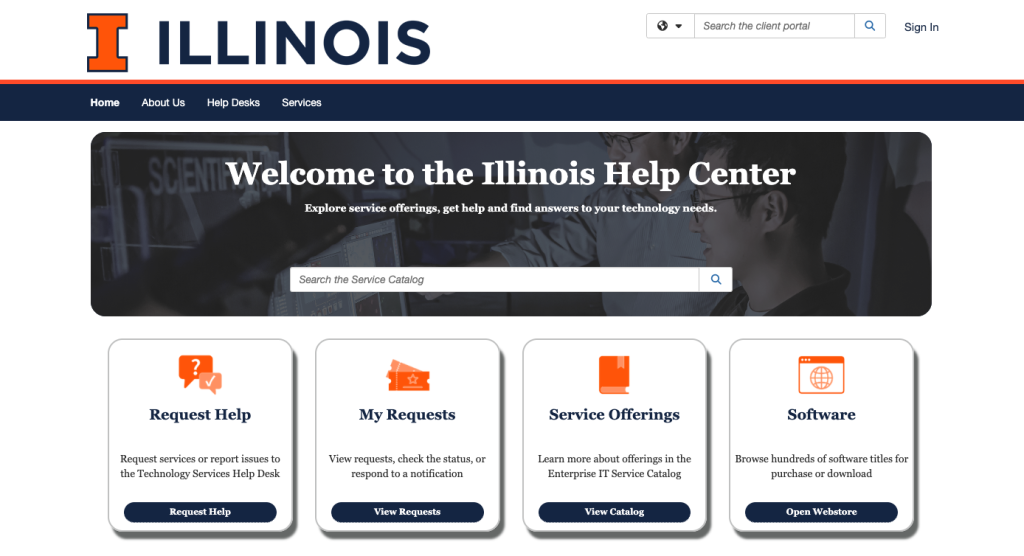
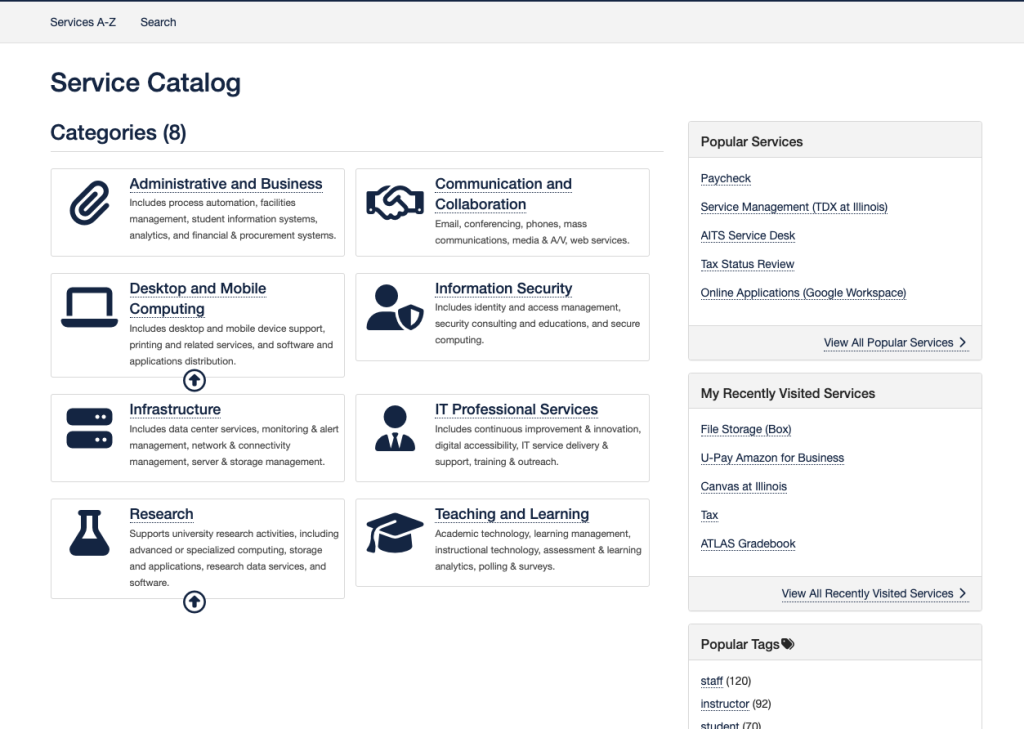
The IT Enterprise Service Management Office at the University of Illinois Urbana-Champaign recently launched the Enterprise IT Service Catalog, a centralized resource focused on helping students, faculty and staff discover, request and obtain support for IT services all across campus. This initiative represents a significant advancement in the way that technology resources are organized and distributed, improving collaboration across IT teams, improving operational transparency and increasing the university community’s access to IT services. Access the catalog on the Illinois Help Center website.

The service catalog is an online repository which consolidates information about the various IT services available at the U of I. Examples of resources listed in the catalog include email, desktop and mobile device support (including printing and related services), identity and access management for help with passwords, A/V services, cloud storage such as Box, Google Drive and One Drive, research software and more. Users can browse the offerings, submit service requests and locate answers to commonly asked questions through an easy–to–navigate platform. The current release focuses on enterprise level IT services that are broadly accessible across the university. 

This project is not simply a redesign of an existing catalog; it’s a new catalog that creates a more transparent method of communicating about IT services, eliminating the need for users to determine which unit they need to contact for assistance. This benefits the Illinois community by providing streamlined access to IT resources, improving organization through standardized service categories and also providing an enhanced user experience with a simplified interface and search functionality.  

Future phases will expand the catalog to include unit-specific IT services and non-IT offerings, such as HR and finance, with the goal of creating a comprehensive universitywide catalog. This will further enhance support for the diverse needs of the Illinois community. Explore the catalog today to take full advantage of the many resources that are available.  

Technology Services
1211 Digital Computer Lab
1304 W. Springfield Ave.
Urbana, IL 61801
Email: consult@illinois.edu
Office of the Chief Information Officer